<?xml version="1.0" encoding="UTF-8"?>
<otrunk xmlns:fo="http://www.w3.org/1999/XSL/Format" xmlns:lxslt="http://xml.apache.org/xslt" id="9112e3ca-f2a6-11db-9fd4-0014c2c34555">
  <imports>
    <import class="org.concord.otrunk.OTSystem"/>
    <import class="org.concord.otrunk.view.OTFolderObject"/>
    <import class="org.concord.otrunk.view.document.OTCompoundDoc"/>
    <import class="org.concord.otrunk.view.document.OTTextObject"/>
    <import class="org.concord.otrunk.view.OTViewEntry"/>
    <import class="org.concord.otrunk.view.OTViewService"/>
    <import class="org.concord.framework.otrunk.view.OTFrame"/>
    <import class="org.concord.otrunk.view.OTViewMode"/>
    <import class="org.concord.otrunk.ui.snapshot.OTSnapshot"/>
    <import class="org.concord.otrunk.ui.snapshot.OTSnapshotButton"/>
    <import class="org.concord.otrunk.ui.snapshot.OTSnapshotAlbum"/>
    <import class="org.concord.otrunk.ui.OTImage"/>
    <import class="org.concord.portfolio.objects.PfCompoundDoc"/>
    <import class="org.concord.portfolio.objects.PfChoice"/>
    <import class="org.concord.portfolio.objects.PfImage"/>
    <import class="org.concord.portfolio.objects.PfResponse"/>
    <import class="org.concord.portfolio.objects.PfQuery"/>
    <import class="org.concord.portfolio.objects.PfResponseTable"/>
    <import class="org.concord.portfolio.objects.PfTechnicalHint"/>
    <import class="org.concord.otrunk.ui.OTText"/>
    <import class="org.concord.data.state.OTDataStore"/>
    <import class="org.concord.sensor.state.OTZeroSensor"/>
    <import class="org.concord.data.state.OTDataChannelDescription"/>
    <import class="org.concord.data.state.OTDataField"/>
    <import class="org.concord.datagraph.state.OTDataGraph"/>
    <import class="org.concord.datagraph.state.OTDataAxis"/>
    <import class="org.concord.datagraph.state.OTDataGraphable"/>
    <import class="org.concord.datagraph.state.OTDataCollector"/>
    <import class="org.concord.datagraph.state.OTMultiDataGraph"/>
    <import class="org.concord.datagraph.state.OTPluginView"/>
    <import class="org.concord.otrunk.control.OTButton"/>
    <import class="org.concord.graph.util.state.OTDrawingTool"/>
    <import class="org.concord.graph.util.state.OTDrawingStamp"/>
    <import class="org.concord.graph.util.state.OTDrawingImageIcon"/>
    <import class="org.concord.graph.util.state.OTDrawingShape"/>
    <import class="org.concord.graph.util.state.OTPointTextLabel"/>
    <import class="org.concord.sensor.state.OTDeviceConfig"/>
    <import class="org.concord.sensor.state.OTExperimentRequest"/>
    <import class="org.concord.sensor.state.OTInterfaceManager"/>
    <import class="org.concord.sensor.state.OTSensorDataProxy"/>
    <import class="org.concord.sensor.state.OTSensorRequest"/>
    <import class="org.concord.otrunkmw.OTModelerPage"/>
    <import class="org.concord.otrunknl4.OTNLogoModel"/>
    <import class="org.concord.otrunkcck.OTCCKModel"/>
    <import class="org.concord.otrunkphet.wave.OTPhetWaveModel"/>
    <import class="org.concord.otrunkphet.sound.OTPhetSoundModel"/>
    <import class="org.concord.otrunkphet.faraday.OTPhetFaradayModel"/>
    <import class="org.concord.pedagogica.ui.RunActivityProperties"/>
    <import class="org.concord.reactiontime.OTReactionTimer"/>
    <import class="org.concord.otrunkphet.dischargelamps.OTPhetDischargeLampsModel"/>
    <import class="org.concord.rttapplets.lineartransformer.OTLinearTransformer"/>
    <import class="org.concord.rttapplets.piecewise.OTLinearPiecewiseGrapher"/>
    <import class="org.concord.rttapplets.qgrapher.OTQGrapher"/>
    <import class="org.concord.rttapplets.fanalyzer.OTLinearFunctionAnalyzer"/>
    <import class="org.concord.rttapplets.quadaticgrapher.OTQuadraticGrapher"/>
    <import class="org.concord.otrunkmw.OTModelerPageEditable"/>
    <import class="org.concord.otrunkphet.skatepark.OTPhetSkateParkModel"/>
    <import class="org.concord.data.state.OTLinearProducerFilter"/>
    <import class="org.concord.data.state.OTIntegratingProducerFilter"/>
    <import class="org.concord.data.state.OTDifferentiatingProducerFilter"/>
  </imports>
  <objects>
    <OTSystem>
      <services>
        <OTViewService showLeftPanel="false">
          <viewEntries>
            <OTViewEntry viewClass="org.concord.otrunk.view.document.OTDocumentView" objectClass="org.concord.otrunk.view.document.OTDocument"/>
            <OTViewEntry viewClass="org.concord.portfolio.views.PfQueryView" objectClass="org.concord.portfolio.objects.PfQuery"/>
            <OTViewEntry viewClass="org.concord.otrunk.ui.swing.OTTextEditView" objectClass="org.concord.otrunk.ui.OTText"/>
            <OTViewEntry viewClass="org.concord.portfolio.views.PfImageView" objectClass="org.concord.portfolio.objects.PfImage"/>
            <OTViewEntry viewClass="org.concord.portfolio.views.PfChoiceView" objectClass="org.concord.portfolio.objects.PfChoice"/>
            <OTViewEntry viewClass="org.concord.datagraph.state.OTDataCollectorView" objectClass="org.concord.datagraph.state.OTDataCollector"/>
            <OTViewEntry viewClass="org.concord.datagraph.state.OTDataGraphView" objectClass="org.concord.datagraph.state.OTDataGraph"/>
            <OTViewEntry viewClass="org.concord.data.state.OTDataFieldView" objectClass="org.concord.data.state.OTDataField"/>
            <OTViewEntry viewClass="org.concord.datagraph.state.OTDataDrawingToolView" objectClass="org.concord.graph.util.state.OTDrawingTool"/>
            <OTViewEntry viewClass="org.concord.datagraph.state.OTMultiDataGraphView" objectClass="org.concord.datagraph.state.OTMultiDataGraph"/>
            <OTViewEntry viewClass="org.concord.otrunk.control.OTButtonView" objectClass="org.concord.otrunk.control.OTButton"/>
            <OTViewEntry viewClass="org.concord.otrunk.ui.snapshot.OTSnapshotButtonView" objectClass="org.concord.otrunk.ui.snapshot.OTSnapshotButton" local_id="snapshot_button_view"/>
            <OTViewEntry viewClass="org.concord.otrunk.ui.snapshot.OTSnapshotAlbumView" objectClass="org.concord.otrunk.ui.snapshot.OTSnapshotAlbum"/>
            <OTViewEntry viewClass="org.concord.otrunk.view.document.OTDocumentView" objectClass="org.concord.otrunk.view.document.OTDocument"/>
            <OTViewEntry viewClass="org.concord.otrunkmw.OTModelerPageView" objectClass="org.concord.otrunkmw.OTModelerPage"/>
            <OTViewEntry viewClass="org.concord.otrunknl4.OTNLogoModelView" objectClass="org.concord.otrunknl4.OTNLogoModel"/>
            <OTViewEntry viewClass="org.concord.otrunkcck.OTCCKModelView" objectClass="org.concord.otrunkcck.OTCCKModel"/>
            <OTViewEntry viewClass="org.concord.otrunkphet.wave.OTPhetWaveModelView" objectClass="org.concord.otrunkphet.wave.OTPhetWaveModel"/>
            <OTViewEntry viewClass="org.concord.otrunkphet.sound.OTPhetSoundModelView" objectClass="org.concord.otrunkphet.sound.OTPhetSoundModel"/>
            <OTViewEntry viewClass="org.concord.otrunkphet.faraday.OTPhetFaradayModelView" objectClass="org.concord.otrunkphet.faraday.OTPhetFaradayModel"/>
            <OTViewEntry viewClass="org.concord.pedagogica.ui.RunActivity" objectClass="org.concord.pedagogica.ui.RunActivityProperties"/>
            <OTViewEntry viewClass="org.concord.reactiontime.OTReactionTimerView" objectClass="org.concord.reactiontime.OTReactionTimer"/>
            <OTViewEntry viewClass="org.concord.otrunkphet.dischargelamps.OTPhetDischargeLampsModelView" objectClass="org.concord.otrunkphet.dischargelamps.OTPhetDischargeLampsModel"/>
            <OTViewEntry viewClass="org.concord.rttapplets.lineartransformer.OTLinearTransformerView" objectClass="org.concord.rttapplets.lineartransformer.OTLinearTransformer"/>
            <OTViewEntry viewClass="org.concord.rttapplets.piecewise.OTLinearPiecewiseGrapherView" objectClass="org.concord.rttapplets.piecewise.OTLinearPiecewiseGrapher"/>
            <OTViewEntry viewClass="org.concord.rttapplets.qgrapher.OTQGrapherView" objectClass="org.concord.rttapplets.qgrapher.OTQGrapher"/>
            <OTViewEntry viewClass="org.concord.rttapplets.fanalyzer.OTLinearFunctionAnalyzerView" objectClass="org.concord.rttapplets.fanalyzer.OTLinearFunctionAnalyzer"/>
            <OTViewEntry viewClass="org.concord.rttapplets.quadaticgrapher.OTQuadraticGrapherView" objectClass="org.concord.rttapplets.quadaticgrapher.OTQuadraticGrapher"/>
            <OTViewEntry viewClass="org.concord.otrunkmw.OTModelerPageEditView" objectClass="org.concord.otrunkmw.OTModelerPageEditable"/>
            <OTViewEntry viewClass="org.concord.otrunkphet.skatepark.OTPhetSkateParkModelView" objectClass="org.concord.otrunkphet.skatepark.OTPhetSkateParkModel"/>
          </viewEntries>
        </OTViewService>
        <OTInterfaceManager>
          <deviceConfigs>
            <OTDeviceConfig configString="none" deviceId="10"/>
          </deviceConfigs>
        </OTInterfaceManager>
      </services>
      <root>
        <OTCompoundDoc>
          <name>Heating by hitting</name>
          <bodyText>
            <div style="background-color: rgb(255, 248, 233); border: border-width: 5px; border-color: red; border-style: solid;">
              <div style="margin: 0px 0px 0px 0px; padding: 0px 20px 10px 20px; font-family: Optima; border: border-width: 5px; border-color: blue; border-style: solid;">
                <h1 style="letter-spacing: 3px; font-family: Optima ExtraBlack;">
Heating by hitting                </h1>
                <div style="margin: 10px 0px 5px 0px; padding: 8px 25px 15px 15px; background-color: rgb(255, 252, 248); font-family: Optima ExtraBlack; border-width: 1px; border-color: silver; border-style: solid; list-style-type: square;">
                  <h2>Introduction/Discovery Question</h2>
                  <div style="margin: 0px 0px 0px 0px; padding: 0px 0px 4px 10px; font-family: Optima;">
                    <p>
                      <strong>When you hit something, does it heat up?</strong>
                    </p>
                    <p>In this activity students measure how much heat is generated when a lump of clay is hit with a weight.</p>
                    <p>When you drop something that isn’t elastic, like a lump of clay or a stone, it hits the ground and stops. It was moving just before it hit the ground, so it had kinetic energy. When it stopped, where did the energy go?</p>
                    <p>One of the most basic principles of physics is the conservation of energy. This means that energy is never created or lost; it is just transformed from one form to another. For example, chemical energy in a battery can become electrical energy in a circuit, which becomes heat and light energy in a light bulb. The gravitational potential energy of a stone that you hold up becomes kinetic energy of motion when you let it go.</p>
                    <p>Write down four other examples of the transformation of energy from one form into another.</p>
                    <p>Now think about hitting something with a hammer. The hammer was moving and then it stopped. What form did the energy change into at that moment? How could you find out?</p>
                    <div style="margin: 10px 10px 10px 10px; padding: 0px 60px 10px 15px;  background-color: rgb(255, 252, 248);">
                      <div style="">
                        <p>
                          <object refid="${to_id_5}"/>
                        </p>
                      </div>
                    </div>
                  </div>
                </div>
                <div style="margin: 10px 0px 5px 0px; padding: 8px 25px 15px 15px; background-color: rgb(255, 252, 248); font-family: Optima ExtraBlack; border-width: 1px; border-color: silver; border-style: solid; list-style-type: square;">
                  <h2>Materials</h2>
                  <div style="margin: 0px 0px 0px 0px; padding: 0px 0px 4px 10px; font-family: Optima;">
                    <ul>
                      <li>Temperature sensor (fast response)</li>
                      <li>Small lump of clay</li>
                      <li>Weight (of known mass) on a string</li>
                      <li>Ruler or measuring tape</li>
                      <li>Gram-weight scale or teaspoon</li>
                    </ul>
                  </div>
                </div>
                <div style="margin: 10px 0px 5px 0px; padding: 8px 25px 15px 15px; background-color: rgb(255, 252, 248); font-family: Optima ExtraBlack; border-width: 1px; border-color: silver; border-style: solid; list-style-type: square;">
                  <h2>Safety</h2>
                  <div style="margin: 0px 0px 0px 0px; padding: 0px 0px 4px 10px; font-family: Optima;">
                    <p>Be careful of others when swinging the weight around.</p>
                  </div>
                </div>
                <div style="margin: 10px 0px 5px 0px; padding: 8px 25px 15px 15px; background-color: rgb(255, 252, 248); font-family: Optima ExtraBlack; border-width: 1px; border-color: silver; border-style: solid; list-style-type: square;">
                  <h2>Procedure</h2>
                  <div style="margin: 0px 0px 0px 0px; padding: 0px 0px 4px 10px; font-family: Optima;">
                    <p>One possibility in a collision is that the kinetic energy of the hammer is changed into heat energy. In this experiment you will explore whether that might be true.</p>
                    <p>1. Make a small lump of clay into a ball. Measure its mass if possible. (Note: 1 teaspoon of clay = ~9 g; 1 tablespoon of clay = ~28g.)
<br/>
2. Bury the temperature sensor in the middle of a lump of clay.
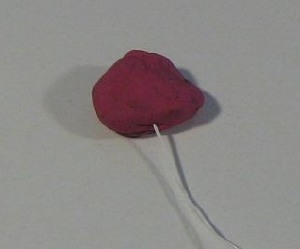
<br/>
<img src="http://itsi.concord.org/resources/images/12_Energy_Conversion/sensor_in_clay.jpg" alt=""/> 
<br/>
3. Attach the clay to a vertical surface, such as a wall or a table leg, in a position where you can hit it with a swinging weight.
<br/>
4. Measure the mass of your weight. Hang the weight from a string such that it hits the clay at the lowest point of its swing.
<br/>
<img src="http://itsi.concord.org/resources/images/12_Energy_Conversion/clay_weight_ruler.jpg" alt=""/> 
<br/>
5. Measure the height of the weight at its lowest point.
<br/>
6. Raise the weight up and measure its height at a position where you will release it. 
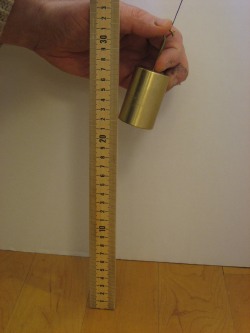
<br/>
<img src="http://itsi.concord.org/resources/images/12_Energy_Conversion/weight-height.jpg" alt=""/>
<br/>
7. Record these two numbers and their difference. This change in height is the gravitational potential energy that the weight will have at the moment you release it.</p>
                    <div style="margin: 10px 10px 10px 10px; padding: 0px 60px 10px 15px;  background-color: rgb(255, 252, 248);">
                      <div style="">
                        <p>
                          <object refid="${to_id_4}"/>
                        </p>
                      </div>
                    </div>
                  </div>
                </div>
                <div style="margin: 10px 0px 5px 0px; padding: 8px 25px 15px 15px; background-color: rgb(255, 252, 248); font-family: Optima ExtraBlack; border-width: 1px; border-color: silver; border-style: solid; list-style-type: square;">
                  <h2>Prediction</h2>
                  <div style="margin: 0px 0px 0px 0px; padding: 0px 0px 4px 10px; font-family: Optima;">
                    <p>If you raise up the weight, release it, and let it hit the lump of clay five times, what will happen to the temperature of the clay?</p>
                    <p>Draw a graph that shows your prediction for the temperature. Label the points on the graph where the weight hits the clay.</p>
                    <div style="margin: 10px 10px 10px 10px; padding: 0px 60px 10px 15px;  background-color: rgb(255, 252, 248);">
                      <div style="">
                        <p>
                          <object refid="${to_id_1}"/>
                        </p>
                      </div>
                    </div>
                    <div style="margin: 10px 0px 10px 0px; padding: 8px 20px 15px 20px;  background-color: rgb(255, 252, 248); border-width: 5px; border-color: silver; border-style: solid;">
                      <div style="">
                        <p>
                          <object refid="${predict_id_1}"/>
                          <br/>
                          <object refid="${snapshot-1}"/>
                        </p>
                      </div>
                    </div>
                  </div>
                </div>
                <div style="margin: 10px 0px 5px 0px; padding: 8px 25px 15px 15px; background-color: rgb(255, 252, 248); font-family: Optima ExtraBlack; border-width: 1px; border-color: silver; border-style: solid; list-style-type: square;">
                  <h2>Collect Data</h2>
                  <div style="margin: 0px 0px 0px 0px; padding: 0px 0px 4px 10px; font-family: Optima;">
                    <p>1. Connect the temperature sensor and start collecting data.
<br/>
2. Raise the weight to the place where you measured its height. Release it and make sure it hits the clay. 
<br/>
3. Repeat the collision four more times  (five hits in all). Note: if the clay gets knocked off, you can take measurements with only one or two hits. The effect won’t be as clear.
<br/>
4. Continue taking data for about 20 seconds after the last collision.
<br/>
5. You can repeat the entire experiment and save more datasets by clicking on the “new” button next to the graph.</p>
                    <div style="margin: 10px 0px 10px 0px; padding: 8px 20px 15px 20px;  background-color: rgb(255, 252, 248); border-width: 5px; border-color: silver; border-style: solid;">
                      <div style="">
                        <p>
                          <object refid="${dc_id_1}"/>
                          <br/>
                          <object refid="${snapshot-2}"/>
                        </p>
                      </div>
                    </div>
                    <div style="margin: 10px 10px 10px 10px; padding: 0px 60px 10px 15px;  background-color: rgb(255, 252, 248);">
                      <div style="">
                        <p>
                          <object refid="${to_id_6}"/>
                        </p>
                      </div>
                    </div>
                  </div>
                </div>
                <div style="margin: 10px 0px 5px 0px; padding: 8px 25px 15px 15px; background-color: rgb(255, 252, 248); font-family: Optima ExtraBlack; border-width: 1px; border-color: silver; border-style: solid; list-style-type: square;">
                  <h2>Analysis</h2>
                  <div style="margin: 0px 0px 0px 0px; padding: 0px 0px 4px 10px; font-family: Optima;">
                    <p>1. How much did the temperature change, on average, for each hit?
<br/>
2. Calculate the gravitational potential energy of the weight that it had when you released it. Note that the height is measured in meters.</p>
                    <p>
                      <strong>PE = m * g * h</strong>
                    </p>
                    <p>PE = potential energy (Joules) 
<br/>
m = mass (grams)
<br/>
g = acceleration of gravity = 9.8 m/s*s
<br/>
h = <strong>change</strong> in height (m)</p>
                    <p>3. Calculate the heat energy that was gained by the clay per hit.</p>
                    <p>
                      <strong>E =  1.7 * m * C * (Tf – Ti)</strong>
                    </p>
                    <p>E = Energy (Joules) 
<br/>
m =  mass (grams)
<br/>
C = heat capacity of modeling clay = 1.7 Joules/g*C (approximate)
<br/>
(Tf – Ti) = <strong>change</strong> in temperature ( C )</p>
                    <p>4. How do these two amounts of energy compare? If they are not the same, why not?</p>
                    <p>5. Describe all the steps by which the initial gravitational energy of the weight ended  up as heat energy in the clay.</p>
                    <div style="margin: 10px 10px 10px 10px; padding: 0px 60px 10px 15px;  background-color: rgb(255, 252, 248);">
                      <div style="">
                        <p>
                          <object refid="${to_id_2}"/>
                        </p>
                      </div>
                    </div>
                  </div>
                </div>
                <div style="margin: 10px 0px 5px 0px; padding: 8px 25px 15px 15px; background-color: rgb(255, 252, 248); font-family: Optima ExtraBlack; border-width: 1px; border-color: silver; border-style: solid; list-style-type: square;">
                  <h2>Conclusion</h2>
                  <div style="margin: 0px 0px 0px 0px; padding: 0px 0px 4px 10px; font-family: Optima;">
                    <p>Compare your results with the results of other groups. Theoretically, if the weight stopped moving when it hit the clay, all of the energy in the weight would end up as heat in the clay. Discuss how you might improve your experiment to get this transfer to happen with as few energy losses as possible.</p>
                    <div style="margin: 10px 10px 10px 10px; padding: 0px 60px 10px 15px;  background-color: rgb(255, 252, 248);">
                      <div style="">
                        <p>
                          <object refid="${to_id_3}"/>
                        </p>
                      </div>
                    </div>
                  </div>
                </div>
                <div style="margin: 10px 0px 5px 0px; padding: 8px 25px 15px 15px; background-color: rgb(255, 252, 248); font-family: Optima ExtraBlack; border-width: 1px; border-color: silver; border-style: solid; list-style-type: square;">
                  <h2>Further Investigation</h2>
                  <div style="margin: 0px 0px 0px 0px; padding: 0px 0px 4px 10px; font-family: Optima;">
                    <p>Repeat this experiment using the improvements that you have thought of.</p>
                    <div style="margin: 10px 10px 10px 10px; padding: 0px 60px 10px 15px;  background-color: rgb(255, 252, 248);">
                      <div style="">
                        <p>
                          <object refid="${to_id_7}"/>
                        </p>
                      </div>
                    </div>
                  </div>
                </div>
                <object refid="${album}"/>
                <div style="margin: 10px 0px 0px 0px; padding: 0px 0px 0px 0px; border: border-width: 5px; border-color: blue; border-style: solid;">
                  <hr/>
                  <div style="text-align: center; font-style: normal; font-family: Optima; color: rgb(0, 102, 0); margin: 0px 20px 0px 20px; padding: 0px 0px 0px 0px;">
                    <font size="-1">
                      <p>SensorPortfolio © 2005-2006 by the Concord Consortium, developed by the <a href="http://teemss2.concord.org">2</a> project.<br/>
This activity was created by itest itest using the <a href="http://itsidiy.concord.org/activities" title="tooltip test"><span class="caps">ITSI</span> Do It Yourself</a> portal.<br/>
This copy of the activity works with <strong>Vernier Go! Link</strong> probeware. If you want to use this activity with a different probeware interface open this web page: <a href="http://itsidiy.concord.org/activities/27">Heating by hitting</a>, select another interface and <strong>Run</strong> the activity again.</p>
                    </font>
                  </div>
                </div>
              </div>
            </div>
          </bodyText>
          <documentRefs>
          	<OTSnapshotButton local_id="snapshot-1" snapshotAlbum="${album}" target="${predict_id_1}"/>
          	<OTSnapshotButton local_id="snapshot-2" snapshotAlbum="${album}" target="${dc_id_1}"/>
          	<OTSnapshotAlbum local_id="album"/>
            <OTText local_id="to_id_1">
              <text>Place answer here!</text>
            </OTText>
            <OTText local_id="to_id_2">
              <text>Place answer here!</text>
            </OTText>
            <OTText local_id="to_id_3">
              <text>Place answer here!</text>
            </OTText>
            <OTText local_id="to_id_4">
              <text>Place answer here!</text>
            </OTText>
            <OTText local_id="to_id_5">
              <text>Place answer here!</text>
            </OTText>
            <OTText local_id="to_id_6">
              <text>Place answer here!</text>
            </OTText>
            <OTText local_id="to_id_7">
              <text>Place answer here!</text>
            </OTText>
            <OTText local_id="to_id_8">
              <text>Place answer here!</text>
            </OTText>
            <OTText local_id="to_id_9">
              <text>Place answer here!</text>
            </OTText>
            <OTDrawingTool name="Drawing" local_id="draw_id_1"/>
            <OTDrawingTool name="Drawing" local_id="draw_id_2"/>
            <OTDrawingTool name="Drawing" local_id="draw_id_3"/>
            <OTDrawingTool name="Drawing" local_id="draw_id_4"/>
            <OTDrawingTool name="Drawing" local_id="draw_id_5"/>
            <OTDrawingTool name="Drawing" local_id="draw_id_6"/>
            <OTDrawingTool name="Drawing" local_id="draw_id_7"/>
            <OTDrawingTool name="Drawing" local_id="draw_id_8"/>
            <OTDrawingTool name="Drawing" local_id="draw_id_9"/>
            <OTDataCollector name="prediction" local_id="predict_id_1">
              <source>
                <OTDataGraphable name="Prediction Graph" connectPoints="true" controllable="true" yColumn="1" drawMarks="false" color="0xff0000" xColumn="0">
                  <dataStore>
                    <OTDataStore local_id="predict_id_1_datastore"/>
                  </dataStore>
                </OTDataGraphable>
              </source>
              <dataSetFolder>
                <OTFolderObject/>
              </dataSetFolder>
              <xDataAxis>
                <OTDataAxis max="60" units="s" min="0" label="Time"/>
              </xDataAxis>
              <yDataAxis>
                <OTDataAxis max="40.0" units="degC" min="0.0" label="Temperature"/>
              </yDataAxis>
            </OTDataCollector>
            <OTDataCollector name="datacollector" multipleGraphableEnabled="false" title="Temperature Sensor and Prediction Graph" local_id="dc_id_1" autoScaleEnabled="true">
              <graphables>
                <OTDataGraphable name="Prediction" connectPoints="true" yColumn="1" drawMarks="false" color="0xff0000" xColumn="0" locked="true">
                  <dataStore>
                    <object refid="${predict_id_1_datastore}"/>
                  </dataStore>
                </OTDataGraphable>
              </graphables>
              <source>
                <OTDataGraphable name="Sensor" connectPoints="true" yColumn="1" drawMarks="false" color="0x0000ff" xColumn="0">
                  <dataProducer>
                    <OTSensorDataProxy name="dataproducer" local_id="dp_dc_id_1">
                      <request>
                        <OTExperimentRequest period="0.1">
                          <sensorRequests>
                            <OTSensorRequest stepSize="0.1" type="0" unit="degC" port="0" requiredMax="40.0" displayPrecision="-1" requiredMin="0.0"/>
                          </sensorRequests>
                        </OTExperimentRequest>
                      </request>
                    </OTSensorDataProxy>
                  </dataProducer>
                  <dataStore>
                    <OTDataStore local_id="ds_dc_id_1"/>
                  </dataStore>
                </OTDataGraphable>
              </source>
              <xDataAxis>
                <OTDataAxis max="60" units="s" min="0" label="Time"/>
              </xDataAxis>
              <yDataAxis>
                <OTDataAxis max="40.0" units="degC" min="0.0" label="Temperature"/>
              </yDataAxis>
            </OTDataCollector>
            <PfChoice local_id="vendor_choice">
              <currentChoice>
                <object refid="${vendor_id_vernier_goio}"/>
              </currentChoice>
              <choices>
                <PfCompoundDoc local_id="vendor_id_vernier_goio">
                  <bodyText>Vernier GoIO</bodyText>
                </PfCompoundDoc>
                <PfCompoundDoc local_id="vendor_id_vernier_labpro">
                  <bodyText>Vernier LabPro</bodyText>
                </PfCompoundDoc>
                <PfCompoundDoc local_id="vendor_id_pasco_sw500">
                  <bodyText>Pasco Science Workshop 500</bodyText>
                </PfCompoundDoc>
                <PfCompoundDoc local_id="vendor_id_pasco_airlink">
                  <bodyText>Pasco Airlink</bodyText>
                </PfCompoundDoc>
                <PfCompoundDoc local_id="vendor_id_dataharvest_easysense_q">
                  <bodyText>Data Harvest Easysense Q</bodyText>
                </PfCompoundDoc>
                <PfCompoundDoc local_id="vendor_id_ti_cbl2">
                  <bodyText>Texas Instruments CLB II</bodyText>
                </PfCompoundDoc>
                <PfCompoundDoc local_id="vendor_id_fourier_ecolog">
                  <bodyText>Fourier Ecolog</bodyText>
                </PfCompoundDoc>
                <PfCompoundDoc local_id="vendor_id_pseudo_interface">
                  <bodyText>Vernier</bodyText>
                </PfCompoundDoc>
              </choices>
            </PfChoice>
          </documentRefs>
        </OTCompoundDoc>
      </root>
    </OTSystem>
  </objects>
</otrunk>